



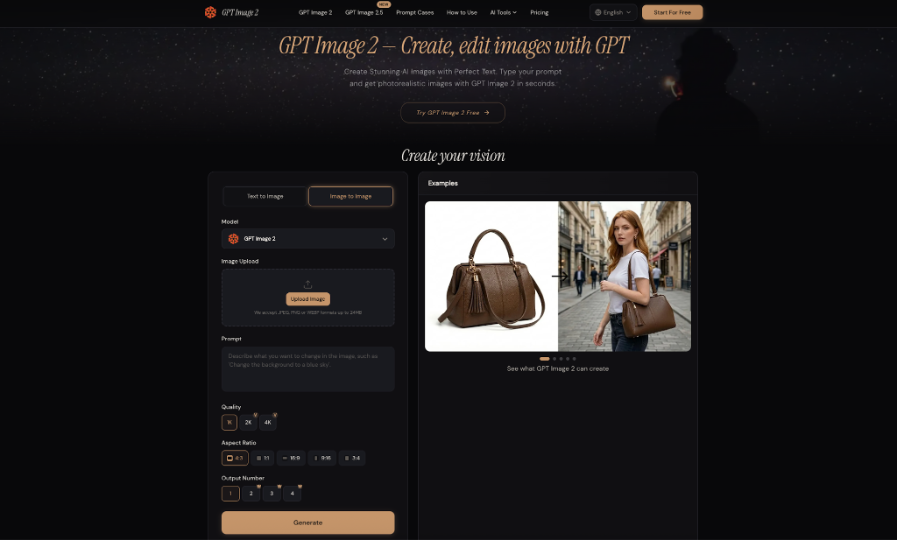
Creators often own more usable images than they think. The problem is that those files were made for yesterday’s purpose: a portrait framed for an About page, a product photo with no space for a new headline, or an illustration tied to an older topic. Instead of treating every finished image as expired, an editor such as GPT Image 2 can use an uploaded picture as the starting point for a new version. Reuse works best when the creator knows which information should survive and which part of the image can change without changing its meaning.
Begin With the Archive, Not the Editor
Open one recent project folder before creating anything new. You are not looking for perfect images. You are looking for strong ingredients: a trustworthy subject, good lighting, a useful camera angle, or a composition that could serve another placement.
Mark each candidate with a short note explaining why it was not used last time. “Too narrow for header.” “Background too busy.” “Good portrait, wrong crop.” “Illustration feels seasonal.” Those notes become editing briefs. An image rejected because the subject is wrong is a poor rescue candidate; one rejected because the left side is crowded may be ideal.
Three Kinds of Images Deserve Different Treatment
Real Images Whose Facts Must Stay Intact
Product photographs, rooms, people, completed client work, and event photos carry factual information. Their value comes partly from documenting reality. Reuse may involve a cleaner crop or removal of a small distraction, but it should not quietly redesign a product or invent a room feature.
Concept Images With More Creative Freedom
A fictional desk scene, abstract editorial illustration, or generated storefront can often be adapted more freely because it is not being presented as evidence. A supporting object can change, the background can be simplified, or a seasonal detail can be refreshed while the overall composition stays recognizable.
Near-Misses That Were Never Published
This category often contains the easiest wins. Maybe the camera angle is strong but there is no room for a headline. Maybe the background steals attention from the subject. Because the image never had a public role, you can evaluate it purely by whether a focused edit makes it useful for the next job.
Follow One Portrait Through a Second Life
Consider a creator portrait taken beside a bookshelf. It works well on an About page, where the full environment helps introduce the person. Months later, a newsletter needs a wide header. The same shelves now compete with the title, but the face, clothing, expression, and soft window light are still exactly right.
The efficient choice is not to generate another portrait. It is to preserve the person and reduce the visual competition around them. A second version might simplify part of the bookshelf into a quiet wall and create more space on one side. The new image has a different job without pretending to be a different person or a different photo session.
Use the Website for a Bounded Edit
On the website, choose Image to Image and upload the source you want to preserve. The interface provides an upload area, prompt field, aspect-ratio controls, and generation options. For this portrait, the prompt should read more like an editing note than a creative brief.
Protect the Information That Gives the Source Its Value
Start with the fixed elements: “Keep the person’s face, hairstyle, expression, clothing, camera angle, and original light direction.” This list tells the editor why the source is worth reusing.
Describe the New Job, Not a Vague Improvement
Then state the change: “Simplify the bookshelf area into a quiet, naturally lit wall and create open space on the left for a newsletter title.”
GPT Image 2 supports uploaded-image editing, making it possible to work from the original portrait rather than trying to recreate it from text alone.
Generate a version and compare it with the source. If the face, clothing, or expression drifts, return to the original and narrow the change. Do not keep repairing a version that has already lost the reason you chose the source image.
Reuse Can Also Mean Reframing, Not Redesigning
Many visual assets fail simply because their original shape no longer fits. A square social illustration may need a wide blog header. A horizontal still life may need a vertical story. Before changing the objects, ask whether composition alone can solve the problem.
Keep the central subject and visual language, then create breathing room where the new placement needs it. Check newly created edge areas for repeated textures, strange architecture, or inconsistent shadows. Reframing is useful because it preserves recognition while giving the image another destination.
Build a Small Family of Versions Instead of One “Final” File
A reusable image is easier to manage when its versions are named by purpose. Keep the source, the cleaned edit, the wide header version, and any seasonal variation as separate files. Do not overwrite the original. If someone later needs the factual source, it should still be obvious which file it is.
For a recurring series, record the stable visual rules rather than saving only one prompt. Perhaps every image uses an overhead view, pale tabletop, and one central object. Next week the notebook can become a calendar, but the viewpoint and light remain consistent. This creates continuity without forcing the exact same picture to appear again.
A Short Reuse Check Before You Publish
Before approving the new version, ask four questions:
- Does the main subject still match the original where accuracy matters?
- Is the new crop or background genuinely useful for the next placement?
- Could a reader mistake a creative edit for documentary evidence?
- Would starting fresh actually require less repair than continuing this edit?
These questions keep reuse practical. An old image does not deserve a second life simply because editing is possible. It deserves one when the new version communicates the next message clearly without sacrificing important truth or creating unnecessary work.
Do Not Confuse Reuse With Repetition
Reusing a visual system does not mean publishing nearly the same image every week. The audience can recognize a series through a stable viewpoint, lighting style, or amount of negative space while the subject still changes meaningfully. If every post keeps the same props and simply swaps one color, the series can start to feel mechanical rather than coherent.
Use the source image as a design reference, not a cage. Preserve the elements that create recognition and refresh the parts that carry the new message. That balance gives the archive practical value without making future content look like recycled leftovers.
A simple archive note can also prevent duplicate work. Record where the approved version was used and whether another format already exists. The next time the same topic returns, you can decide quickly whether to reuse, revise, or start over.
Let Old Images Improve New Briefs Too
Even files you decide not to reuse can teach you something. If last year’s headers repeatedly lacked negative space, build subject position into future prompts. If real product photos constantly require background cleanup, simplify the physical shooting setup. If a recurring series never looks related, choose one compositional rule to carry forward.
The archive becomes a record of decisions rather than just storage. That is the deeper value of reuse: not squeezing another post out of every file, but learning what visual information is worth preserving and planning future assets around those lessons.
Conclusion
AI image editing can extend the useful life of visuals that still contain strong information. Start by auditing the archive, separate factual source images from flexible concept art, and identify near-misses with a specific reason for revision. Use a bounded uploaded-image edit when the subject already works, preserve the original, and create versions for clear new purposes rather than endless variations. Reuse is successful when the next asset feels intentional and truthful, not merely recycled. Before generating another image from scratch, check whether your existing library already contains most of what the new job needs.


